Sub‑D Modeling + AI: The Emerging Workflow Reshaping Automotive Interior Concept Design
A geometry‑first, AI‑accelerated workflow for Sub‑D‑based automotive interior concept design.
At PSH Design, we work inside fixed launch windows, compressed timelines, and demanding surface standards. For most new vehicle programs, the automotive interior concept phase is the silent bottleneck.
The bottleneck isn’t creativity. It’s the gap between a great idea and decision‑ready geometry.
In many interior design studios, it still takes between 8 and 16 weeks to move from an initial brief to a 3D direction solid enough that both design and engineering can align on it. When you run multiple vehicle programs at once, a single delay in the interior concept‑to‑engineering handoff can ripple through validation gates and carry a very real cost of delay every week you slip.
Launch management studies show that a 12‑month delay on a major automotive program can wipe out hundreds of millions in lifetime profit for a large OEM. In a world of simultaneous EV launches, platform renewals, and frequent facelifts, the gap between a great interior design idea and decision‑ready geometry is no longer a minor process issue. It is a strategic risk.
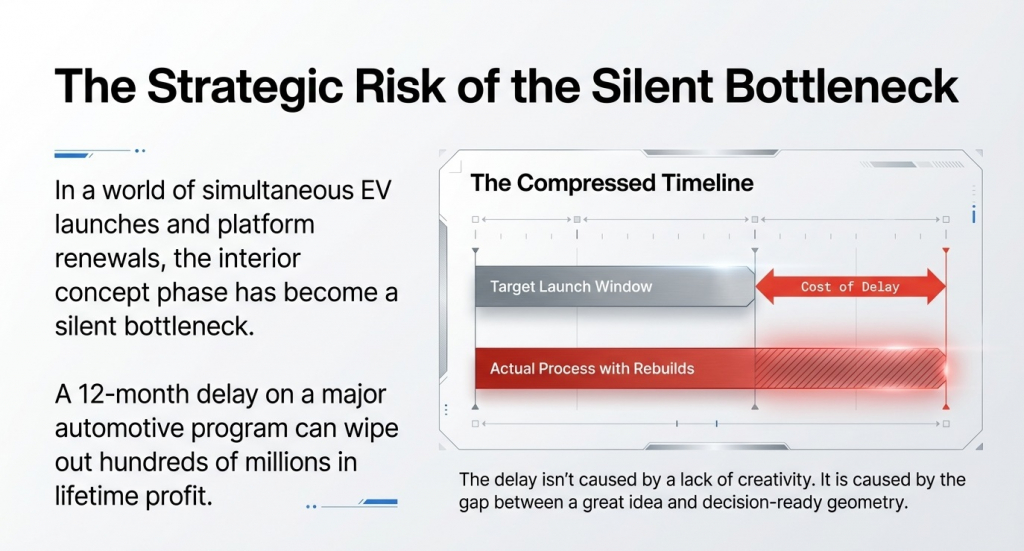
The bottleneck is not a lack of creative talent. It is not even the lack of tools. The bottleneck is when we actually know whether the surfaces and geometry will hold up in the real world.
The Bottleneck: Why Current Concept Tools Create a Strategic Risk
Over the last decades, the automotive interior concept design workflow has evolved from pure clay to a hybrid of digital sketching, 3D blockouts, CGI and clay verification. Clay still plays a critical role in clinics and leadership reviews, while 2D renders and CGI have become the primary communication tools for interior concepts inside OEMs and with marketing teams. This system produces an enormous amount of beautiful imagery – but it does not close the gap between approved visuals and geometry that engineering can actually use.
In many automotive design studios, the interior concept process still begins with sketches and 2D renders. These are outstanding communication tools, but they have a built-in flaw: the 3D geometry that engineering relies on is usually rebuilt almost from scratch after the visual concept has been “approved”. Every rebuild is a point where surface quality can degrade and timelines can slip.
New AI image generators like Midjourney or Stable Diffusion are powerful for creating mood boards and reference material, but when used on their own they do not solve this structural problem. Pure AI images often contain perspective errors, lack true spatial accuracy, and – crucially – do not contain any usable geometry data. You cannot run ergonomic or packaging checks on them.
The result is a pattern we see often in automotive interior design workflows: beautiful renders that create more meetings, not fewer. More images mean more subjective discussion, while the actual 3D data still has to be built later, under time pressure.
What the industry needs now is not just more beautiful automotive interior renders. It needs buildable output – fast: output that is visually convincing enough to make decisions and geometrically trustworthy enough for engineering to join the conversation early.
The industry has optimized for beautiful output. What it actually needs is buildable output — fast.
The Flaw in 2D Renders and Pure AI Images
The core flaw in a sketch‑first and image‑only workflow is simple:
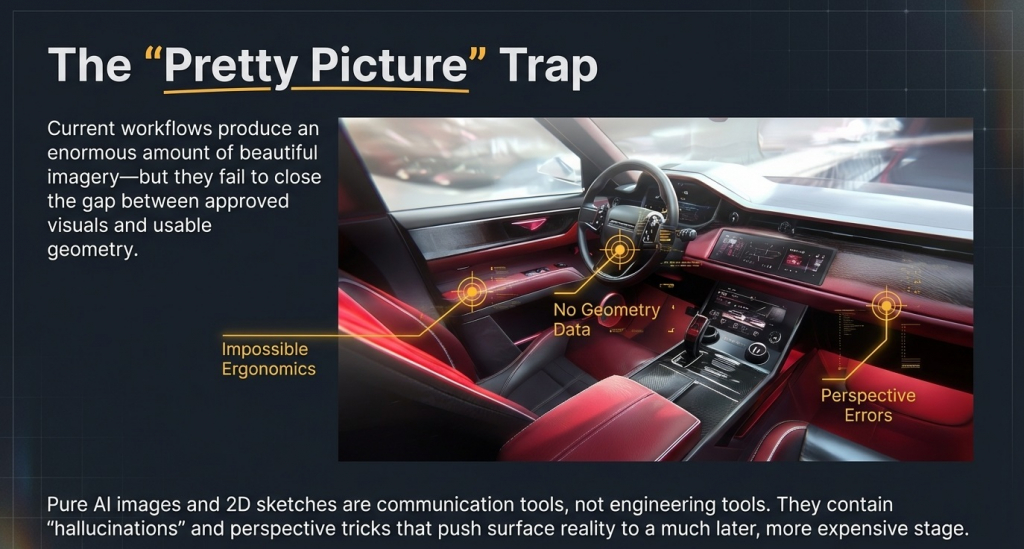
- 2D renders – whether hand‑drawn, CGI, or AI‑generated – are communication tools, not engineering tools.
- Beautiful automotive interior images with no underlying geometry cannot be used for ergonomic analysis, packaging checks, or downstream surface development.
- Perspective tricks, stylized proportions, and AI hallucinations may help sell an idea, but they usually push surface reality to a much later stage – often to clay review, when changes are expensive and slow.
That gap between “approved image” and “verified geometry” is exactly where concept‑phase delays accumulate.
The Sub‑D + AI Hybrid Approach: An AI‑Accelerated Interior Workflow
Over the past years, we have been implementing a new workflow at PSH Design for automotive interior concept development: a Sub‑D modeling foundation combined with an AI‑accelerated visualization loop. This is not a magic toolset that replaces the OEM’s existing process. It is a concept acceleration workflow: it brings real geometry to the table early and uses AI to dramatically compress the visual iteration time on top of that geometry.
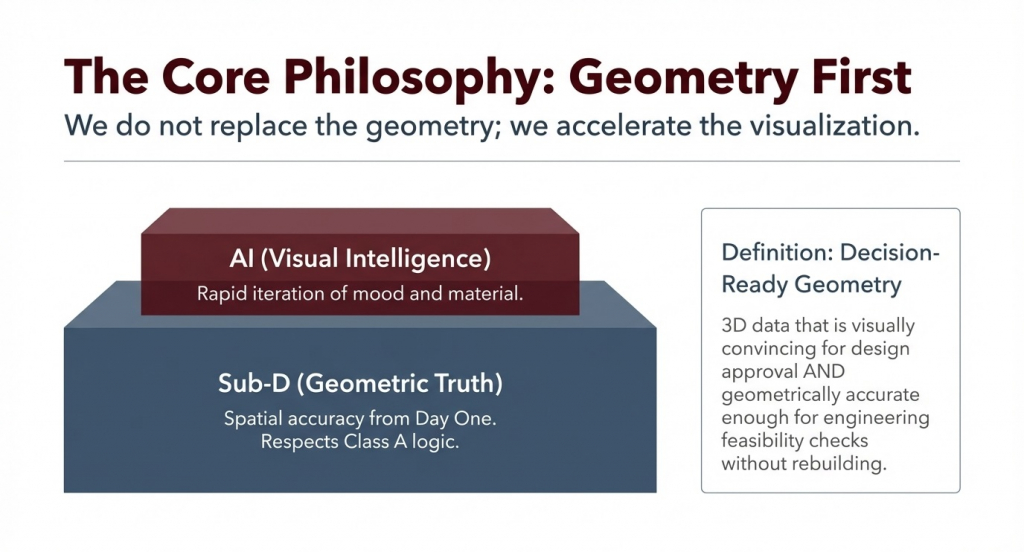
Before going further, it is useful to define two key terms clearly:
- Class A surfacing refers to the highest standard of 3D surface quality in automotive manufacturing – surfaces that meet strict mathematical continuity requirements for reflection, curvature and tangency across every transition. These are the surfaces that the customer ultimately sees and judges.
- Decision‑ready geometry means 3D data that is simultaneously visually convincing enough for design approval and geometrically accurate enough for engineering to begin packaging, ergonomic and feasibility analysis, without first rebuilding the model.
Why Sub‑D Is the Non‑Negotiable Foundation
Subdivision Surface modeling (Sub‑D modeling) is a way of building 3D surfaces by subdividing a coarse mesh into smooth, continuous surfaces. In automotive interior design, where most surfaces are organic, highly curated and unforgiving, Sub‑D is particularly well‑suited.
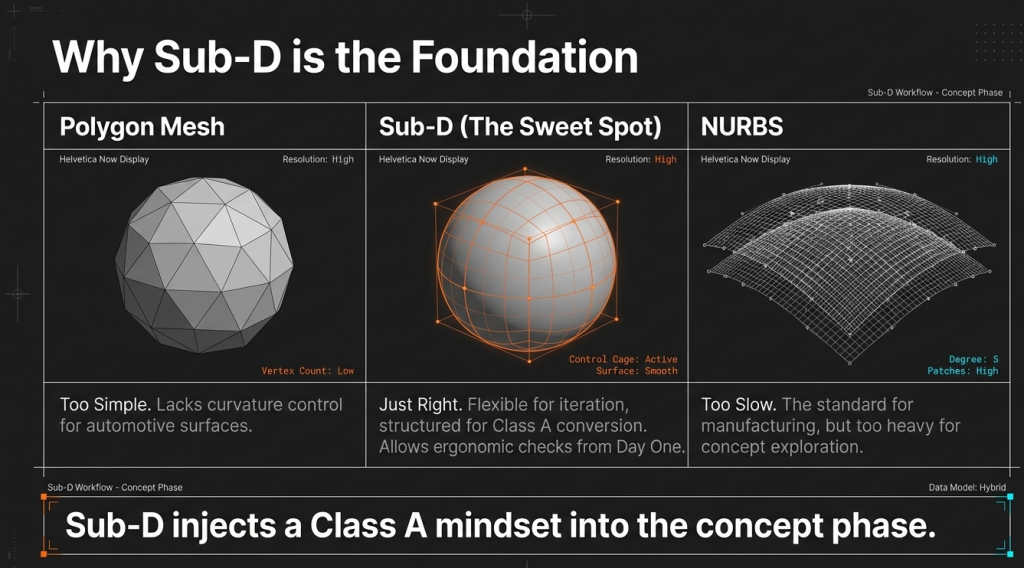
For a Design Director or Technical Lead, the comparison is straightforward:
- Polygon mesh
Fast to block out, but often lacks the continuity and curvature control required for downstream Class A surfacing and high‑quality automotive interior surfaces. - NURBS
Excellent for final Class A production data, but heavy and relatively slow for early‑stage exploration where design directions are still evolving. - Sub‑D
Flexible enough for rapid iteration during the automotive interior concept phase, yet structured enough to convert into NURBS / Class A later when production data is required.
In a Sub‑D‑based automotive interior concept workflow:
- We have spatial accuracy from day one – no perspective errors or “cheated” proportions like you get with sketches or pure 2D renderings.
- We can run ergonomic and packaging checks at the blockout stage – legroom, reach envelopes, sightlines, and basic HMI positioning can be validated before any clay is cut.
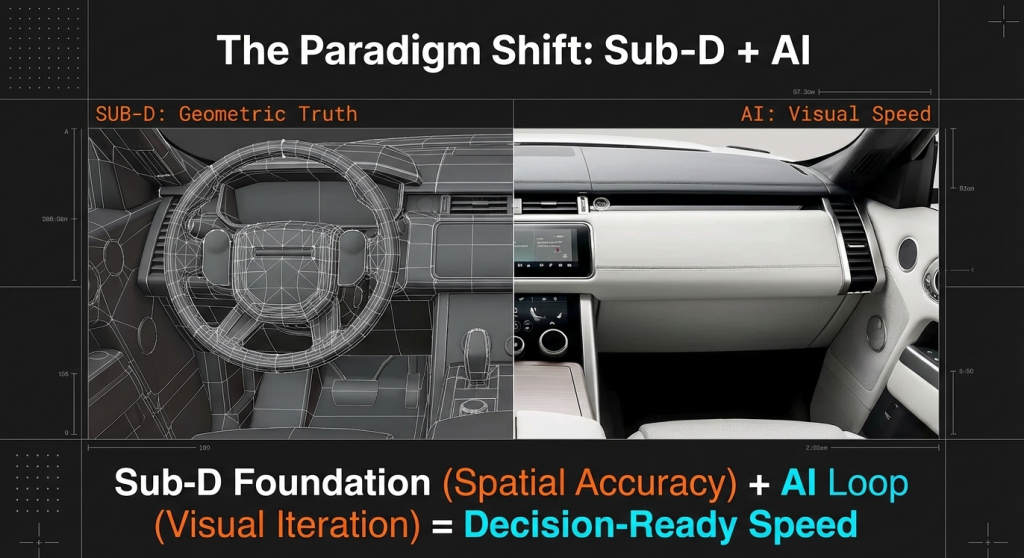
- Sub‑D becomes the truth layer. Every AI‑generated render, every mood exploration, sits on top of geometry that respects Class A logic from the beginning.
In our earlier article on Elegant Simplicity and Class A Surfacing, we showed why minimalist modernist interiors are actually the most unforgiving environments for automotive surface design: with fewer distractions, every surface transition becomes a focal point. Sub‑D allows us to inject that Class A mindset into the very first days of concept, instead of discovering surface problems at the end of the pipeline.
AI’s Role: Visual Intelligence, Not Geometric Replacement
In this workflow, AI does not replace the designer and does not replace the geometry. AI brings visual intelligence: it accelerates how fast you can see materials, lighting, and mood on top of the correct geometry.
Three tool types play specific roles in our AI‑assisted automotive interior design process:
- Midjourney (or similar tools)
Used as a direction finder. We generate 30–50 reference images for interior design language, material combinations, and lighting moods. The result is not a final interior design, but a high‑quality visual brief that helps the team align on directions in hours instead of days. - Vizcom
The key difference from text‑to‑image AI is its ability to draw over 3D. Designers bring in the Sub‑D blockout of the interior, sketch a few strokes to indicate LED lines, material boundaries or detail breaks, and the AI renders a photorealistic interior image constrained by the actual 3D geometry. Camera angle, proportions and spatial relationships stay honest. - KREA.AI
Acts as a real‑time demonstration layer. Its real‑time rendering capability means that as you rotate or adjust the 3D interior model, the AI render updates live. This makes it ideal for client presentations and internal alignment sessions where you want decisions to happen in the room, not three emails later.
In practice:
- Sub‑D handles geometric truth.
- AI handles visual iteration.
Without robust geometry, AI produces impressive but unbuildable images. Without AI, geometry is slow to communicate and slow to iterate visually.
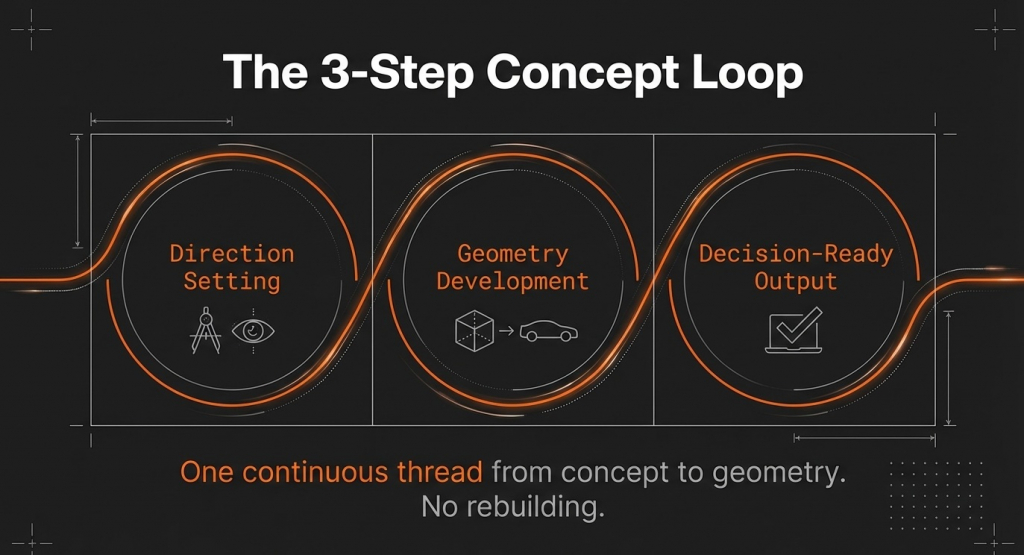
The 3‑Step Concept Loop: From Brief to Decision‑Ready Output
Loop 1: Direction Setting (2–4 Hours)
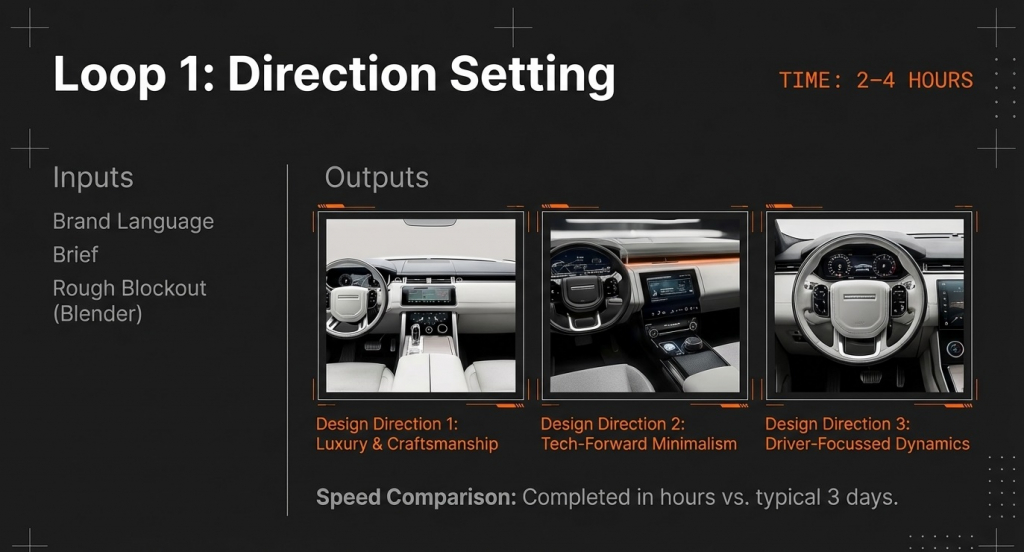
- Objective : Arrive at three clear interior concept directions that both the design team and stakeholders can react to.
- Tools
- Midjourney or similar AI tools to generate curated reference packs aligned with the brand’s interior design language.
- Blender Sub‑D to build quick interior blockouts for these directions.
- Vizcom produces fast photorealistic renders on top of the Sub‑D geometry.
- Timeline : Can be completed in 2–4 hours, instead of the 2–3 days that a traditional sketch‑plus‑render loop often requires, for simpler directions and clear briefs in our experience.
Loop 2: Geometry Development (1–2 Days)
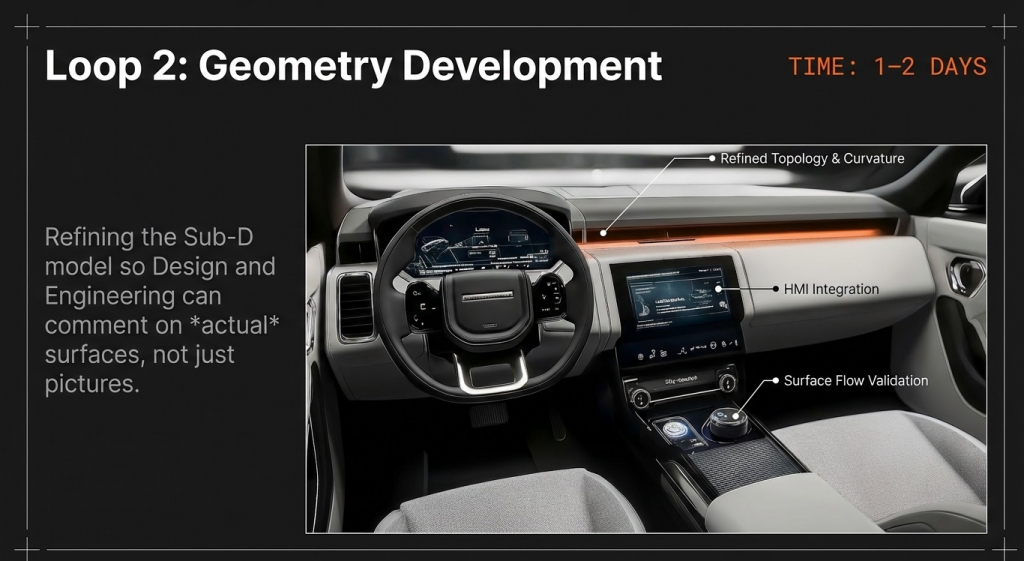
- Objective : Develop a refined Sub‑D interior model with key surfaces defined – instrument panel, door cards, console, clusters, major transitions.
- Tools
- Blender Sub‑D refinement for topology, curvature continuity and surface flow.
- Vizcom to explore material zones, color splits and lighting scenarios directly on the Sub‑D geometry.
- Timeline : Typically 1–2 working days to bring the chosen automotive interior concept direction to a level where both design and engineering can begin making informed comments.
Loop 3: Decision‑Ready Output (~1 Day)
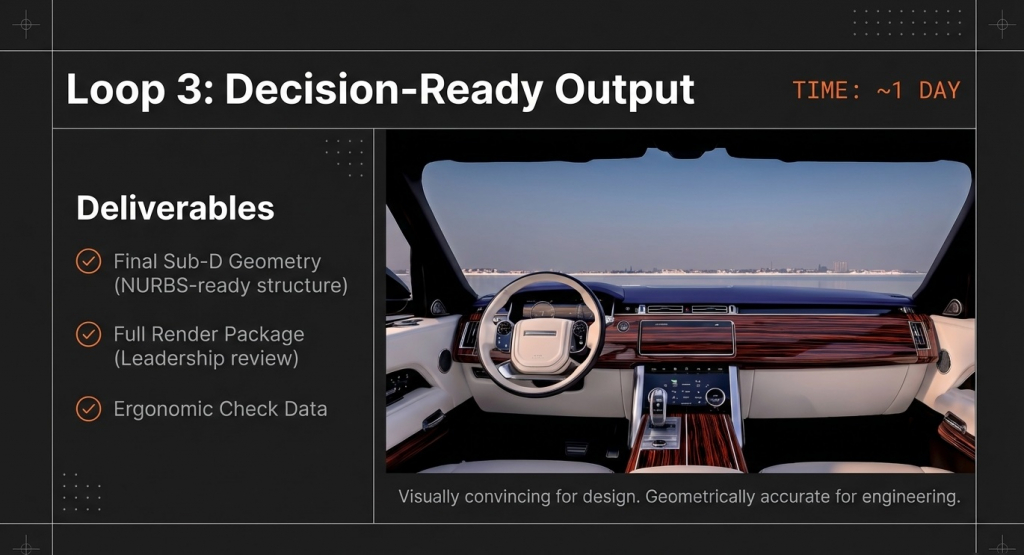
- Objective
Deliver output that is both client‑presentable and engineering‑extractable – in other words, decision‑ready geometry. - Tools
- Final Sub‑D file, structured to be converted into NURBS / Class A surfacing.
- KREA real‑time demo for live rotation, material tweaks and lighting adjustments during presentations.
- Outputs
- Sub‑D interior geometry data.
- A full set of interior renders for internal and leadership reviews.
- Geometry and views ready for ergonomic checks and early packaging conversations.
- Timeline
Approximately one additional working day after Loop 2.
Three loops. One continuous thread from concept to geometry. No rebuilding from scratch after approval.
Core Benefits for Design Directors & Program Managers
From our experience, three specific benefits keep showing up in automotive interior concept projects.
- Compressed Timeline with Geometry Intact
- Traditional: 8–16 weeks from brief to a 3D direction that design and engineering can align on.
- Sub‑D + AI Loop: around 5 working days to reach a similar “decision‑ready” milestone, in pilot projects and depending on program complexity and organizational readiness.
- Geometry is never rebuilt from scratch – it evolves from day one with a Class‑A mindset.
- Engineering‑Extractable from Day One
- No more “beautiful render that must be rebuilt into CAD”.
- Sub‑D geometry can be extracted into a NURBS / Class A surfacing path as soon as the concept is approved.
- Engineering can engage earlier with real data, not just pictures.
- Live Iteration in Client Presentations
- Static renders often mean days of back‑and‑forth for every decision.
- With KREA and similar tools, you can rotate the cockpit, adjust materials and lighting in real time, on true Sub‑D geometry.
- Decisions happen in the room, not after three email chains.
Honest Limitations: What This Workflow Is and Isn’t
We do not see the Sub‑D + AI interior design workflow as a magic replacement for Class A engineering or the OEM’s established process. We position it as a bridge between concept speed and surfacing depth – not a substitute for either.
Concept Phase Only (Not Final Class A)
- The primary output is concept‑stage Sub‑D geometry with a clear path toward Class A.
- Final production data still goes through ICEM Surf, Alias and OEM surface approval gates.
- At PSH Design, we use this workflow to bring surface truth into the concept phase, then hand it over to our Class A surfacing team.
AI Render Accuracy Limits (Specular / Chrome)
- Highly specular materials like chrome and glass still expose AI limitations.
- We treat AI renders as a fast way to explore mood and composition, then refine key hero views with traditional visualization when necessary.
Strict IP & Confidentiality Controls
- Confidential briefs and geometry are not pushed into public AI services.
- We use self‑hosted / enterprise AI or keep sensitive data off public infrastructure, depending on the engagement.
Sub‑D Expertise Is Non‑Negotiable
- AI cannot rescue poor Sub‑D geometry; bad topology means bad output.
- Our 17+ years of Class A surfacing experience directly shape how we build Sub‑D for interiors: every model is constructed with a “Class A‑ready” mindset.
We position this workflow as the bridge between concept speed and surface engineering depth — not a replacement for either.
Real‑World Case Study: Premium British Compact SUV Interior
Earlier this year, PSH Design applied this Sub‑D + AI interior concept workflow to a test pilot project for a premium British OEM – a compact luxury SUV in a segment known for its distinctive interior design language and demanding surface standards.
Context
- Vehicle segment: compact luxury SUV, premium British brand.
- Challenge: compressed interior concept timeline, very high expectations on surface quality, multiple material zones (leather, sustainable fabrics, metallic finishes, ambient lighting).
Workflow
- Midjourney to build visual reference boards for the brand’s reductive, modern luxury interior language.
- Sub‑D interior blockouts in Blender for cockpit, IP, door trims, center console, with topology prepared for later Class A surfacing.
- Vizcom iterations on material breaks, details and lighting built directly on Sub‑D geometry.
Output
- A complete Sub‑D interior geometry set ready for ergonomic checks and packaging conversations.
- A full render package for internal and leadership reviews.
- Clear documentation on how this AI‑assisted workflow plugs into existing OEM gates, rather than trying to replace them.
The concept phase for this pilot finished significantly faster than comparable programs using a traditional sketch‑to‑render‑to‑rebuild workflow, while meeting our own internal surface quality criteria for a premium automotive interior. Surface issues that would typically only appear at clay review were identified and corrected in the digital loop – when changes cost hours, not weeks.
We do not use OEM names, model names or any commercially identifiable details in public material. Every example remains at the level of “premium British OEM” and “compact luxury SUV” in line with our confidentiality obligations.
Frequently Asked Questions
Q: How long does automotive interior concept development typically take?
A: In traditional workflows, 8–16 weeks from brief to an approved 3D direction is common. Sub‑D + AI hybrid approaches can compress this to approximately 5 working days for simpler programs with clear briefs, based on our pilot projects.
Q: Can Sub‑D geometry be used directly for Class A surfacing?
A: Sub‑D output is not final Class A data, but it provides a structured foundation that can be converted into NURBS / Class A pipelines – significantly reducing rebuild time compared to starting from concept renders.
Q: Is AI‑assisted automotive interior design confidential?
A: Client briefs and geometry should not be pushed into public AI services. Responsible implementations use self‑hosted or enterprise‑grade AI tools with clear IP and data usage agreements, or keep sensitive data on infrastructure that never connects to public AI.
Q: What is the difference between Sub‑D modeling and NURBS in automotive design?
A: Sub‑D is better suited for concept exploration thanks to its flexibility and speed. NURBS is the standard for final Class A production data. In a robust automotive interior workflow, the two are complementary, not competing: Sub‑D for concept‑stage geometry, NURBS for production surfaces.
Are You Ahead of AI‑Accelerated Design, or Already Delivering With It?
The tools now exist. The workflow is being tested and refined in real automotive interior briefs with real constraints – timelines, budgets, brand standards, surface quality. The studios and design leaders who are refining it now will not be announcing it when it is “ready” – they will already be delivering with it.
If you are currently scoping an automotive interior concept development project and want to understand how a Sub‑D modeling + AI automotive design workflow could plug into your program – with your brand, your process and your IP constraints:
Use the contact form : https://pshdesign.com/rfq-free-test-project/ .
Related topics:
Elegant Simplicity: The Class A Surfacing Precision Behind Modernist Design Language
CAS Design and Class A Modeling: The Complete Guide from Concept to Perfection
PSH Design
17+ years of CAS, Class A Surfacing, CAD and Reverse Engineering for Automotive, Aerospace, Medical and Industrial, to OEM standard.
Concept Design & CAS · Class A Surfacing · CAD Engineering · Reverse Engineering
Work of this kind is easier to judge than to describe.