How long reverse engineering one part takes (12–48 engineering hours, 2–3 working days), what decides the price, how the deviation report lets you check the model before paying, and what to send for a quote within 24 hours.
Reverse Engineering Cost and Lead Time: What Decides Both, and What to Send for a Fast Quote
日本語版はこちら → · Deutsche Version →
At PSH Design, rebuilding one part from scan data takes about 12 to 48 engineering hours: around 12 for a gear, 16 for a medium casting or a machined part, 48 for a mold. Across roughly 300 parts a year the average is about 10 hours. On the calendar, a medium part usually ships in 2–3 working days. Pricing is per part, built on those same hours, and quoted within 24 hours — from a few photos or a 2D drawing.
The owner of a metrology lab rarely asks what reverse engineering is. They already know. The question they actually have is sharper: if I take this job from my customer, what delivery date can I promise, and how much margin is left?
This note answers that question with numbers from the roughly 3,000 hours of reverse engineering we do every year, and have done since 2009. It covers four things in order: how long it takes, what it costs, how you know the model is right before you pay, and what to send for a quote.
How Long Does Reverse Engineering Take? Hours by Part Type
The figures below are engineering hours — the time one engineer actually spends on the part, from opening the scan to exporting the file. They are not calendar days; those come further down.
| Part type | Typical engineering hours | What drives it |
|---|---|---|
| Gear | ~12 h | Repeating geometry, rebuilt from parameters |
| Machined part | ~16 h | Planes, holes, steps — a clean parametric rebuild |
| Medium casting | ~16 h | Draft, fillets, free-form faces |
| Mold set | ~48 h | Several parts, parting surfaces, cavities |
| Average across all work | ~10 h | Over roughly 300 parts a year |
Those hours include checking the scan, modeling, comparing the model against the scan, exporting in the format you need — and, normally, the 2D drawing as well.
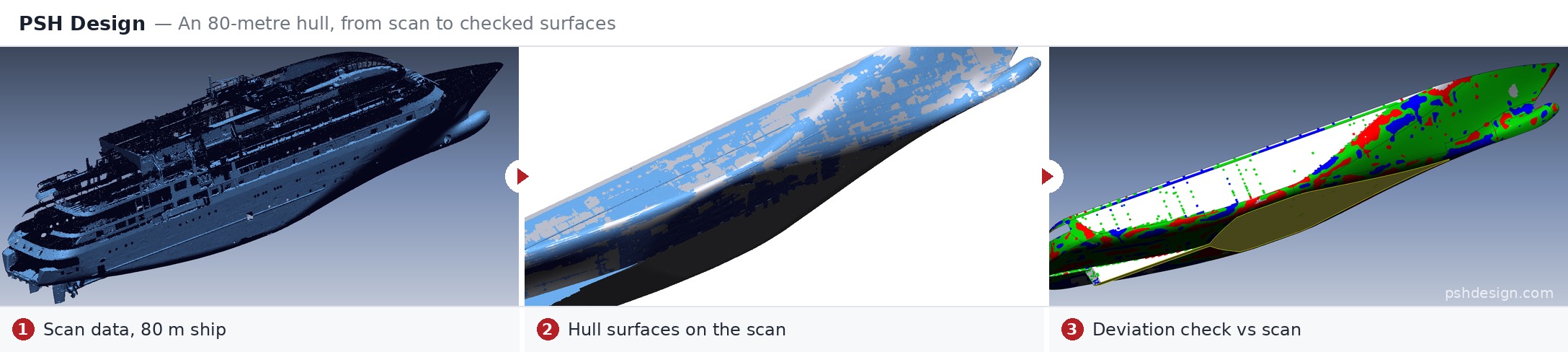
Size does not decide the hours. It sounds backwards, and it is the thing new customers find most surprising. The hull of an 80-meter vessel can take fewer hours than a complex mold set a fraction of its size, because what drives the time is how many features a part has and how tightly they depend on each other — not how many meters it spans. A hull is large but continuous. A mold set has every face answering to the face opposite it.
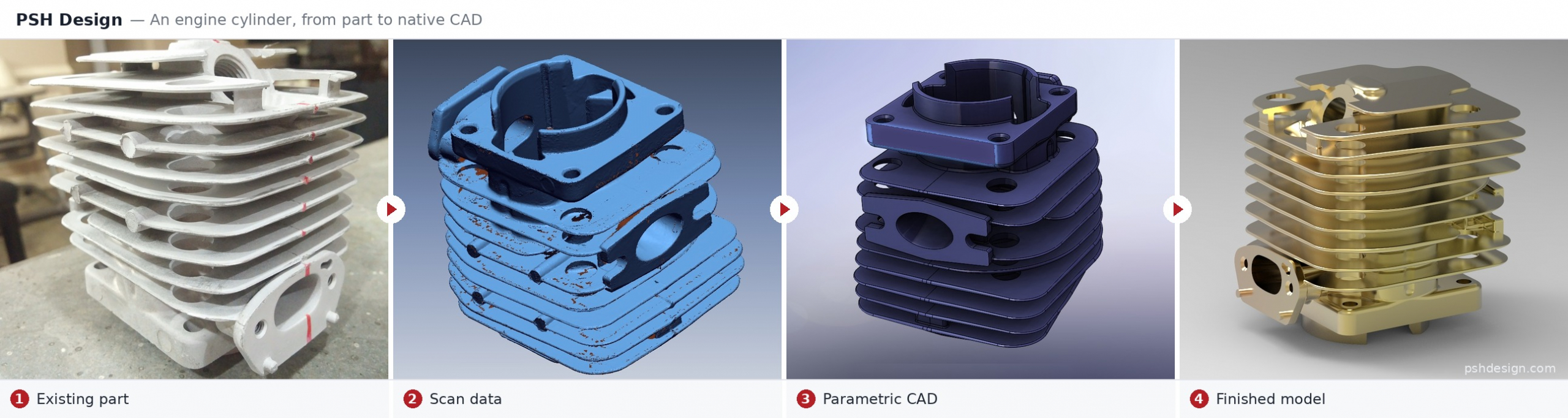
A worked example: the cylinder above took 32 engineering hours — twice a typical medium casting. It is not a large part. What took the time was a stack of thin cooling fins, each following the one below it, around bores and a port flange that all had to line up. That is exactly the kind of interdependence that decides the hours. It was delivered as a native SolidWorks parametric model.
Where the Hours Go: The Process, Step by Step
Knowing where the hours go also tells you where they can be saved.
1. Receive and assess the scan. An engineer opens the data and looks for missing areas, reflective patches, holes the scanner never reached, and noise. If a scan is poor, send it anyway — we will tell you honestly how far it can go. Experience rescues a lot, but a region that was never measured cannot be rebuilt correctly by anyone. Better to say so on day one than on delivery day.
2. Align and clean the mesh. This is the step that is always underestimated. However good the scan, there is noise at sharp edges, holes in deep pockets, and stray points from the fixture.
3. Decide the rebuild method and the design intent. A parametric rebuild, or a NURBS surface that follows the scan as-built? If the part is worn, do we model the nominal dimensions or the part as it is today? That decision belongs to an engineer, not to the software, and it decides whether the model can be used for production. (Our note You Bought the Scanner. Who Builds the CAD? explains the two methods.)
4. Model. Most of the hours sit here.
5. Compare against the scan. The model is laid over the scan and colored by distance — more on that below.
6. Export native files and drawings. The model is rebuilt in your end customer’s own CAD system — SolidWorks, Creo, CATIA, NX, Inventor, Solid Edge — not handed over as a STEP file alone. 2D drawings follow your standard. (See CAD File Formats for why native matters.)
Hours Are Not Days: The Delivery Calendar
For a lab owner, the number that matters is the date you can promise your customer, not engineering hours.
- Quotes within 24 hours.
- A medium part usually ships in 2–3 working days from receiving a complete scan.
- The time difference works for you. Hanoi is 11 hours ahead of the US East Coast in summer and 12 in winter. You send the job at the end of your day, we work through ours, and progress is waiting when you open in the morning.
- Rush jobs are accepted whenever the schedule allows, at no extra charge — a medium part can often be turned around in one working day. When your lab is chasing a bid or a date you have already promised, we are on your side of the table. An early delivery that wins you the bid or protects your name is worth more than any surcharge we could add.
- Batches run in parallel. Twelve experienced engineers give us capacity for about ten parts a day. Ten parts do not take ten times as long.
Six Things That Make a Job Take Longer
These are lessons from our workshop over 17+ years. Most of them are outside either side’s control unless they are raised early.
1. Missing scan coverage. Deep pockets, internal bores, underside faces hidden by the fixture. For every missing area the engineer has to infer the geometry, and inferring takes longer than measuring.
2. Shiny or dark surfaces scanned without a matte coat. Structured-light and laser scanners depend on reflected light; shiny or black surfaces return noisy data full of holes, and mesh cleanup grows accordingly. A temporary matte scanning spray saves far more hours than it costs.
3. The wrong output type. A parametric model for a part that only needs an as-built record spends hours for nothing. The reverse — accepting a NURBS as-built surface and then discovering you need to change dimensions — means starting again. For the same part, a parametric rebuild typically takes about 25% longer than NURBS as-built, because the engineer has to settle the design intent and rebuild to nominal dimensions.
4. Draft and fillets in negative CAD. On castings and molded parts, draft is typically 1° to 3°, more on textured faces or deep walls. Model it short or wrong and the part still looks right on screen — but parts from that tool stick in the cavity on ejection, scratch, get scrapped, or damage the mold. Parts with repeating structure — trays, ribbed panels, bases with many fillets — are where fillet errors show up most.
5. Native files for the right CAD system. Every CAD system is built on its own geometric kernel. Translating automatically through a neutral format such as STEP strips the feature history and often leaves dirty geometry behind: gaps between faces, overlapping faces, bodies that are not closed, rebuilt fillets that no longer meet. These are silent errors — they surface only when your end customer opens the file to edit it. Our engineers sometimes pass a model through more than one CAD system to resolve fillets and repeated faces before delivery. It adds hours, and they are hours worth spending. (See CAD Kernel.)
6. Worn or deformed parts. The real question is whether to model what the part was or what it is. For ordinary mechanical parts, copying a worn surface to the micron and sending it back into production helps no one. What you need is a model that can be manufactured again. That decision needs a conversation, and the conversation takes time too.
What Reverse Engineering Costs, and What Decides the Price
We do not publish a fixed price list, and that is deliberate. Two parts of similar size can differ by a factor of two or three in hours. A flat rate would either overcharge you for the simple part or make us lose money on the hard one.
Pricing is per part, built on the estimated engineering hours — so everything in the section above that makes a job longer is also what makes it cost more. The rest is terms:
- Quoted within 24 hours, part by part.
- No minimum order. One part is a job.
- Volume discounts for larger batches.
- The first part is modeled at our cost, so you judge the result rather than the proposal.
- No rush surcharge whenever the schedule allows.
- One invoice at the end of the month for everything delivered in it, NET 30 from the invoice date.
- Every model warranted for life for the work we did. New design changes are quoted as new work.
For a lab, the real question is whether there is margin left on resale. A simple benchmark: our rate runs at about 70% of what you would pay for a contract CAD designer of your own — before counting the three to five years it takes to train one, and at least two CAD licenses paid all year for work that only arrives now and then. (The full calculation is in What CAD In-House Costs.)
How Do You Know the Model Is Right Before You Pay for It?
Every model we deliver comes with a deviation report: your scan and our CAD laid over each other and colored by the distance between them. Green sits on the scan; warm colors stand proud of it, cool colors fall below.
The report shows you three things:
- the whole part at a glance — where it deviates, and in which direction;
- the exact value at any point you care about;
- a section through the features that matter.
It is the same way you check a physical part, so there is nothing new to learn.
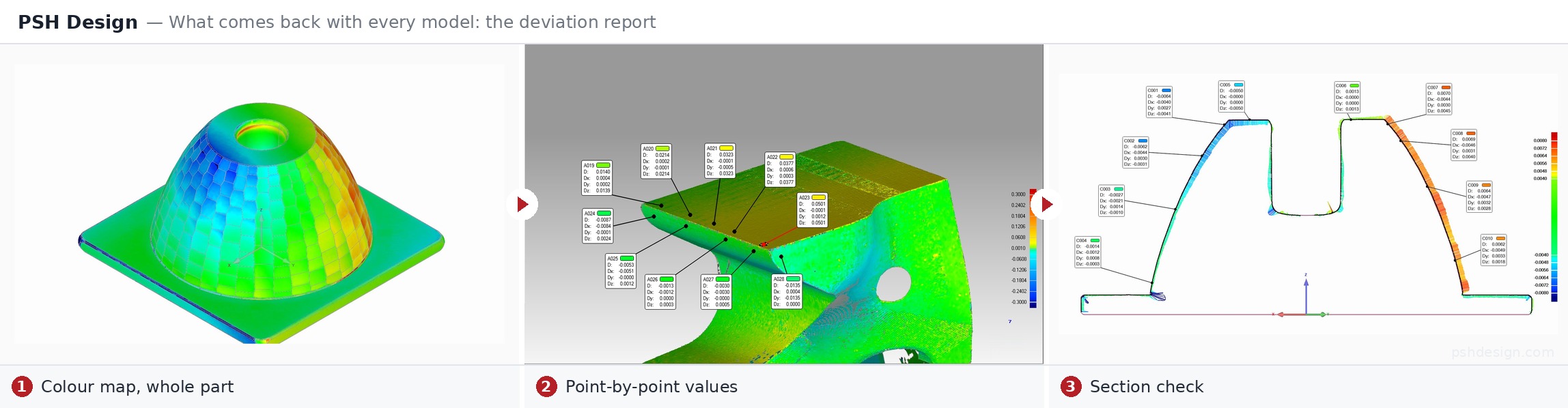
As for the numbers: a parametric rebuild typically sits within ~0.1 mm of the scan. A NURBS surface that follows the scan as-built reaches ~0.025 mm, and can go down to 0.01 mm on a clean, accurate scan. The parametric deviation is intentional: the model follows the design dimensions, not every mark of wear on the surface.
And because we invoice at the end of the month, NET 30, the report is in your hands long before anything is due.
What to Send for a Fast Quote
You do not need a scan to get a quote. A few photos of the real part from different sides, or a 2D drawing, are enough for a close estimate of the hours. The scan can follow once the job is agreed.
For a tighter quote and a faster job, add:
- A complete scan, including datum faces and internal pockets where they can be reached.
- The target CAD system and version your end customer uses.
- Critical features and tolerances — mating faces, locating holes, anything that must not move.
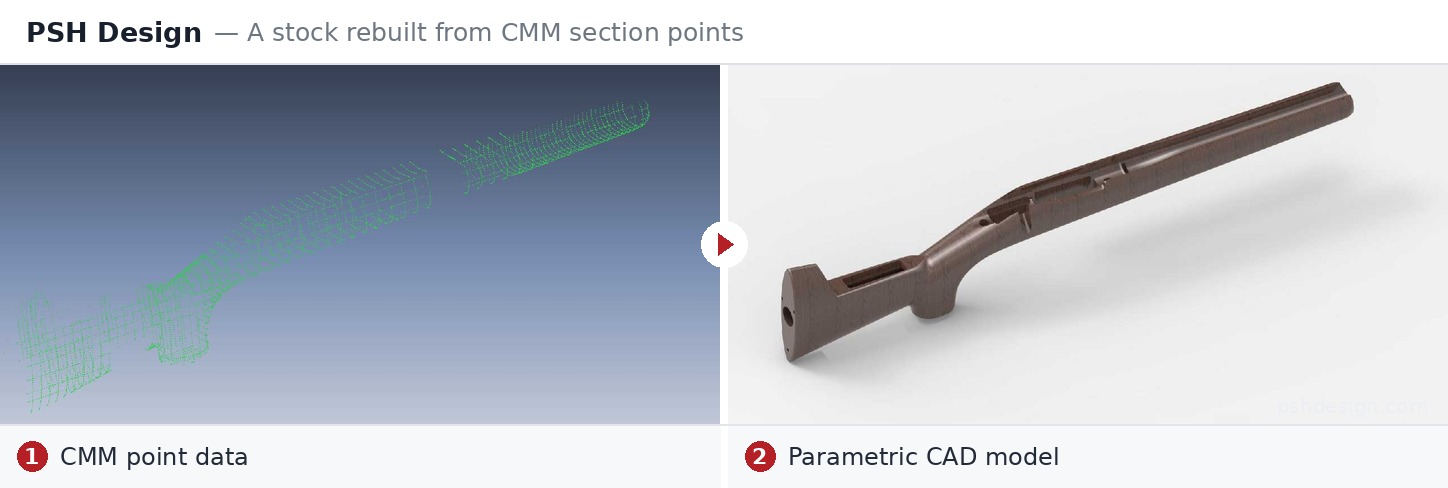
- CMM points or old drawings, if you have them. We can build a complete parametric model from CMM points alone, with no scan at all.
- Similar parts grouped into one batch. The second part in a family is almost always faster than the first.
A First Quote Is an Estimate — and We Treat It as One
The quote for a first part is made before anyone has actually opened the data. It is an estimate, and we treat it as one. If a part takes us a little longer than we said, we do not come back to re-price it. A working relationship is not decided on a single part.
What matters more to us is that the hours become easy to read. After a handful of jobs, most of the labs we work with can look at a new part and tell, within a few hours, what it will take. From then on, a quote is less a negotiation than a formality.
Two US metrology labs have worked with us continuously since 2014 and 2015. We also support labs in Canada, Germany, Sweden, Austria and Australia.
What We Do Not Take On
Saying this plainly saves everyone time:
- Automatic mesh-to-model conversion for hobby 3D printing — work that does not need a mechanical engineer. There are tools that do it cheaper than we can.
- Freelance-style one-off jobs with no relationship behind them.
- We work as a long-term B2B partner: clear invoices, NET 30, lifetime warranty, and NDA by default on every job — not on request, and not as an extra step you have to ask for.
- Scanning usually stays with you. We have scanners in Hanoi and know the craft, but for an international lab, scanning on site or nearby is faster and cheaper than shipping the part to Hanoi and back. The exception is a large batch of objects that do not need to be returned.
Frequently Asked Questions
How long does it take to reverse engineer one part?
About 12 to 48 engineering hours depending on the part type, with an average of around 10 hours at PSH Design. A medium part usually ships in 2–3 working days from receiving a complete scan.
Do you charge extra for a rush job?
No. Whenever the schedule allows, PSH Design reorders its work to meet a bid or a delivery date a lab has already promised, at the same price. A medium part can often be turned around in one working day.
Does a bigger part take longer to reverse engineer?
Not necessarily. The number of features and how tightly they depend on each other decide the hours, not physical size. An 80-meter hull can take less time than a complex mold set a fraction of its size.
Is a parametric rebuild slower than a NURBS as-built model?
Yes, typically by about 25%. A parametric rebuild requires settling the design intent and modeling to nominal dimensions, while a NURBS as-built surface follows the measured shape.
Can you quote without a scan?
Yes. A few photos of the real part or a 2D drawing are enough for a quote, which comes back within 24 hours. The scan can be sent once the job is agreed.
Is the 2D drawing included in the quote?
Normally, yes. The 2D drawing is part of the quoted hours and follows the customer’s own drawing standard.
How can I check the model before paying?
Every model comes with a color deviation report comparing it against your scan — whole-part map, point values and sections. Invoices are issued at the end of the month, NET 30, so the report arrives well before payment is due.
What happens if the job takes longer than quoted?
The quoted price stands. A first quote is an estimate, and a small overrun is PSH Design’s to carry.
Reverse engineering at PSH Design
Written for you if you run a metrology, CMM or 3D-scanning business — or an engineering team — and need scan or CMM data rebuilt as parametric CAD, delivered native in the system your customer works in. Not for you if you need a quick mesh for 3D printing, or modelling with no engineering intent behind it. We do not take that work, and saying so saves both sides time.
Read in this order:
- You Bought the Scanner. Who Builds the CAD? — what usable CAD means to the people downstream, and the two rebuild methods.
- What CAD In-House Costs, What a Day Costs, and What Actually Grows a Lab — software, training, lead time, and the number most quotes leave out.
- Scaling Inspection Services with a Reverse Engineering Partner — how an inspection business adds CAD capacity through a partner rather than a department.
- Reverse Engineering Services — formats, tolerances, lead times and terms.
Then judge the work, not the words: send one part — a scan, a CMM report or a drawing — and we build it at our cost →
PSH Design
17+ years of CAS, Class A Surfacing, CAD and Reverse Engineering for Automotive, Aerospace, Medical and Industrial, to OEM standard.
Concept Design & CAS · Class A Surfacing · CAD Engineering · Reverse Engineering
Work of this kind is easier to judge than to describe.